Samiam’s Scribble Pad

April 15, 2009

Half tone stencilling with 30% less repeditive strain injury

Filed under: Uncategorized — admin @ 2:49 pm

The process I came up with is pretty straight forward

  1. get an image
  2. crop to 4:3 or any other neat golden mean which you can find a canvas for
  3. reduce to a small number of pixels, I used 160x120px
  4. drop to greyscale
  5. 8 colour palette using dithering
  6. save as gif
  7. run it through program below to make a black square for each pixel
  8. convert SVG to PostScript
  9. use Poster to blow it up to 4×4 A4 sheets to the size of your canvas
  10. Print to overhead transperancys, you will get registration points and numbering of the tiles
  11. cut out all the squares to make stencils
  12. apply black enamel paint to white canvas
  13. enjoy the analog digital fusion
  14. 160×120 pixels means you have to cut out 19200 little squares

Another idea would be to get 8 hole punches and change the code below to indicate what radius hole punch to use

that would cut down on the rsi by at least 80%

1
2
3
4
5
6
7
8
9
10
11
12
13
14
15
16
17
18
19
20
21
22
23
24
25
26
27
28
29
30
31
32
33
34
35
36
37
38
39
40
41
42
43
44
45
46
47
48
49
50
51
52
53
54
55
56
57
58
59
60
61
62
63
64
65
66
67
68
69
70
71
72
73
74
75
76
77
78
79
80
81
82
83
84
85
86
87
88
89
90
91
92
93
94
95
96
97
98
99
100
101
102
103
104
105
106
107
108
109
110
111
112
113
114
115
116
117
118
119
120
121
122
123
124
125
#!/usr/bin/env python
"""\
SVG.py - Construct/display SVG scenes.
 
The following code is a lightweight wrapper around SVG files. The metaphor
is to construct a scene, add objects to it, and then write it to a file
to display it.
 
This program uses ImageMagick to display the SVG files. ImageMagick also
does a remarkable job of converting SVG files into other formats.
"""
import math
import os
 
from PIL import Image
 
display_prog = 'display' # Command to execute to display images.
 
class Scene:
	def __init__(self,name="svg",height=400,width=400):
		self.name = name
		self.items = []
		self.height = height
		self.width = width
		return
 
	def add(self,item): self.items.append(item)
 
	def strarray(self):
		var = ["<?xml version=\"1.0\"?>\n",
			   "<svg height=\"%d\" width=\"%d\" >\n" % (self.height,self.width),
			   " <g style=\"fill-opacity:1.0; stroke:none;\n",
			   "  stroke-width:0;\">\n"]
		for item in self.items: var += item.strarray()
		var += [" </g>\n</svg>\n"]
		return var
 
	def write_svg(self,filename=None):
		if filename:
			self.svgname = filename
		else:
			self.svgname = self.name + ".svg"
		file = open(self.svgname,'w')
		file.writelines(self.strarray())
		file.close()
		return
 
	def display(self,prog=display_prog):
		os.system("%s %s" % (prog,self.svgname))
		return
 
 
class Line:
	def __init__(self,start,end):
		self.start = start #xy tuple
		self.end = end	 #xy tuple
		return
 
	def strarray(self):
		return ["  <line x1=\"%d\" y1=\"%d\" x2=\"%d\" y2=\"%d\" />\n" %\
				(self.start[0],self.start[1],self.end[0],self.end[1])]
 
 
class Circle:
	def __init__(self,center,radius,color):
		self.center = center #xy tuple
		self.radius = radius #xy tuple
		self.color = color   #rgb tuple in range(0,256)
		return
 
	def strarray(self):
		return ["  <circle cx=\"%d\" cy=\"%d\" r=\"%04f\"\n" %\
				(self.center[0],self.center[1],self.radius),
				"	style=\"fill:%s;\"  />\n" % colorstr(self.color)]
 
class Rectangle:
	def __init__(self,origin,height,width,color):
		self.origin = origin
		self.height = height
		self.width = width
		self.color = color
		return
 
	def strarray(self):
		return ["  <rect x=\"%04f\" y=\"%04f\" height=\"%04f\"\n" %\
				(float(self.origin[0]),float(self.origin[1]),float(self.height)),
				"	width=\"%d\" style=\"fill:%s;\" />\n" %\
				(self.width,colorstr(self.color))]
 
class Text:
	def __init__(self,origin,text,size=24):
		self.origin = origin
		self.text = text
		self.size = size
		return
 
	def strarray(self):
		return ["  <text x=\"%d\" y=\"%d\" font-size=\"%d\">\n" %\
				(self.origin[0],self.origin[1],self.size),
				"   %s\n" % self.text,
				"  </text>\n"]
 
 
def colorstr(rgb): return "#%x%x%x" % (rgb[0]/16,rgb[1]/16,rgb[2]/16)
 
def test():
	curImage = Image.open("/home/samh/input.gif")
	dimensions = curImage.size
 
	#print dimensions
	scale = 20.0
	scene = Scene('test',dimensions[1]*scale,dimensions[0]*scale)
	paletteSize = 8.0#len(curImage.palette.palette)/len(curImage.palette.getdata()[0])
	for row in range(dimensions[0]):
		for column in range(dimensions[1]):
			size = math.pow( (1 - float(curImage.getpixel((row,column)))/float(paletteSize))*2,0.5) * scale
			dimension = scale/float(paletteSize) * size
			black  = (0,0,0)
			bottomRight = (row*scale,column*scale)
			scene.add(Rectangle(bottomRight,dimension/5.0,dimension/5.0,black))
	scene.write_svg(filename="test.svg")
	scene.display(prog="inkscape")
	return
 
if __name__ == '__main__': test()

February 25, 2009

the amazing dark spot

Filed under: Uncategorized — Tags: — admin @ 5:26 pm

darkspot

If you are curious click this link

January 31, 2009

Intersection of a line and a Cone

Filed under: Uncategorized — admin @ 11:12 am

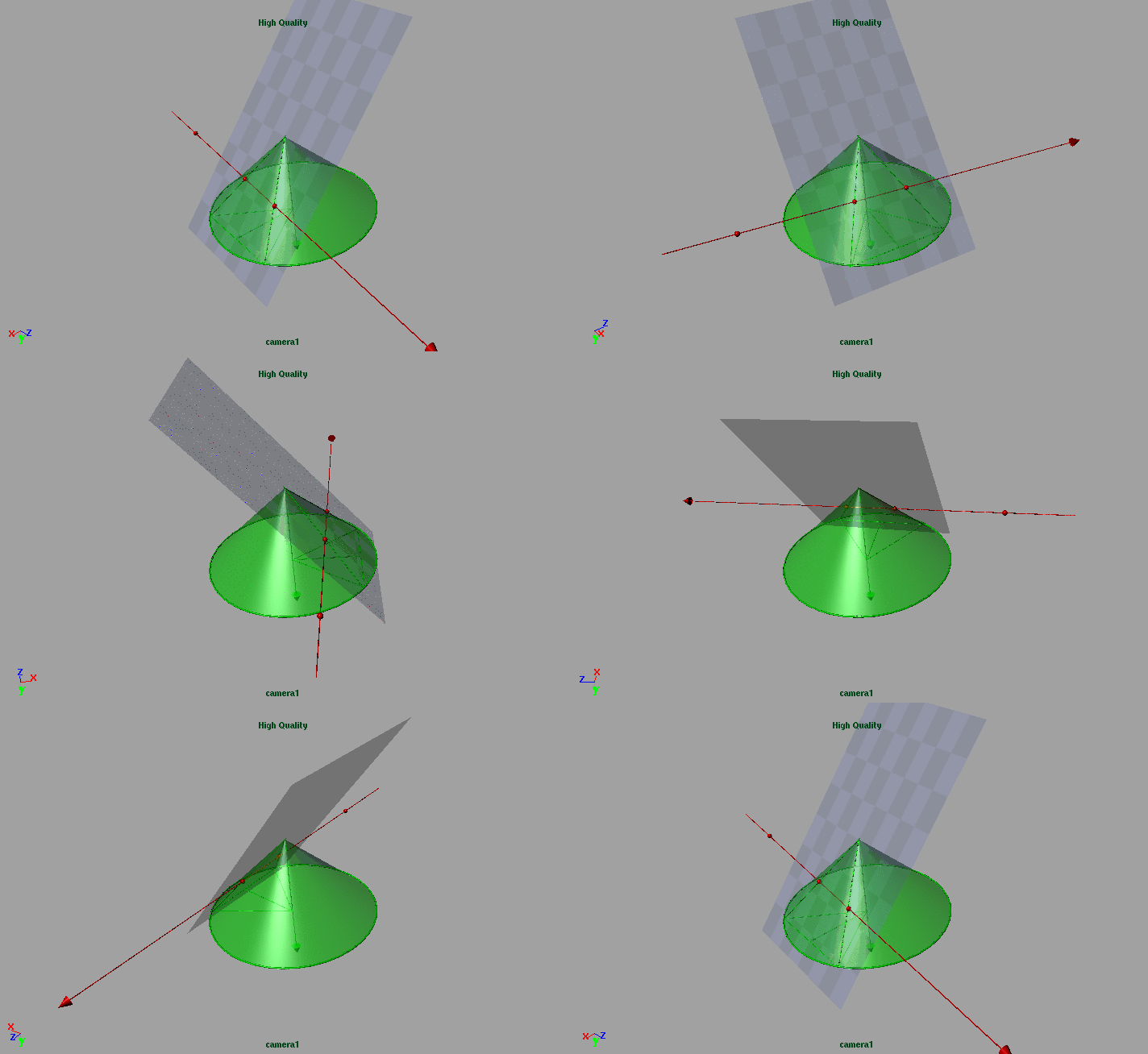
Currently I am trying to make some volume lights at work

To optimise I need to work out where the eye ray intersects a implicit cone

Animation of the Intersection of a line and a Cone

Animation of the Intersection of a line and a Cone

You will find some links and a quick animation below

When I have cracked the renderman solution I may post that too

(more…)

January 22, 2009

In memory of Vida Symons: Nanna

Filed under: Uncategorized — admin @ 11:11 am

I wrote this on the 23 January 2008 8:10:17 PM

Our Dearly Beloved Grandmother had passed away, it wasnt a shock, she was an old lady and it was her time to go

This year we are heading back to Kangaroo Island to scatter her ashes on the family farm

(more…)

January 12, 2009

voxel madness

Filed under: linkedin,Uncategorized — Tags: , — admin @ 11:07 pm

Basically I want a big block of RiPoints to shade into, so I made them like this

I used  cgKit to make a big block of points, now I just need to see how it performs under stress

Parent Voxel script

voxelParent.py

#!/usr/bin/env python
from cgkit.ri import *
 
"""
RiProcedural(data, bound, subdividefunc, freefunc=None)
    Declare a procedural model.
 
    subdividefunc and freefunc may either be the standard RenderMan
    procedurals (RiProcDelayedReadArchive, RiProcRunProgram,
    RiProcDynamicLoad and RiProcFree) or Python callables.
    In the former case, data must be a sequence of strings or a single
    string containing the data for the functions. In the latter case,
    data may be any Python object which is just passed on to the
    functions.
    freefunc is optional and defaults to None.
 
    Because this module can only produce RIB, a custom subdivide function is
    simply called with a detail value of RI_INFINITY to generate all the
    data at once.
 
    Example: RiProcedural("mymodel.rib", [-1,1,-1,1,-1,1], \
                          RiProcDelayedReadArchive, RI_NULL)
 
             RiProcedural(["python teapot.py",""],[0,1,0,1,0,1], \
                          RiProcRunProgram, RI_NULL)
 
             RiProcedural(["teapot.so",""],[0,1,0,1,0,1], \
                          RiProcDynamicLoad, RI_NULL)
"""
 
import sys
 
args = sys.stdin.readline()
 
while args:
	arg = args.split()
	size=float(arg[0])
	parts=int(arg[1])
	seed=int(arg[2])
	childCount=int(arg[2])
	childSeed = seed
	for xstep in range(parts):
		for ystep in range(parts):
			for zstep in range(parts):
				xmin = xstep - 0.5*size/parts - size*0.5
				xmax = xstep + 0.5*size/parts - size*0.5
				ymin = ystep - 0.5*size/parts- size*0.5
				ymax = ystep + 0.5*size/parts- size*0.5
				zmin = zstep - 0.5*size/parts- size*0.5
				zmax = zstep + 0.5*size/parts- size*0.5
				childSeed+=1
				print RiProcedural(["python voxelChild.py","%s %s %s %s %s %s %s %s" % (xmin,xmax,ymin,ymax,zmin,zmax,childSeed, childCount)],[xmin,xmax,ymin,ymax,zmin,zmax], RiProcRunProgram, RI_NULL)
	sys.stdout.write('\377')
	sys.stdout.flush()
	args = sys.stdin.readline()

Child Voxel Script

#!/usr/bin/env python
from cgkit.ri import *
 
from cgkit.cgtypes import *
 
import sys
import random
args = sys.stdin.readline()
 
while args:
	arg = args.split()
	xmin=float(arg[0])
	xmax=float(arg[1])
	ymin=float(arg[2])
	ymax=float(arg[3])
	zmin=float(arg[4])
	zmax=float(arg[5])
	childSeed=int(arg[6])
	childCount = int(arg[7])
	pointList = []
	pointSize = vec3(xmax-xmin,ymax-ymin,zmax-zmin).length() / float(childCount)
	for xstep in range(childCount):
		childSeed+=1
		random.seed(childSeed)
		xval = random.uniform(xmin,xmax)
		random.jumpahead(1)
		yval = random.uniform(ymin,ymax)
		random.jumpahead(1)
		zval = random.uniform(zmin,zmax)
		random.jumpahead(1)
		pointVal = vec3(xval,yval,zval)
		pointList.append(pointVal)
	print RiPoints(P=pointList,constantwidth=[pointSize])
	sys.stdout.write('\377')
	sys.stdout.flush()
	args = sys.stdin.readline()

Just add brick map or ptc based 3d look up shader and rejoice!

I still have an outstanding testing of seeing if it acutally produces geometry and see if it looks good, but they are small details ;)

January 10, 2009

A prediction of shadows with six meter trees (Ornamental Pear)

Filed under: Uncategorized — admin @ 4:57 pm

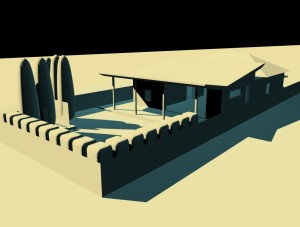
house_6_10

Since the previous attempt with the large purple spheres,  went back to the scene file and check the scale and looked at the tree we are wanting to plant , ornamental pears

Burkes Backyard gives them a rundown here

We are looking at getting the cultivar called “Capital” because its tall and thin

Capital Pear (Pyrus calleryana ‘Capital’)
Columnar flowering tree. White flower clusters in early spring. Green glossy leaves change to purple in the fall. Used in narrow spaces.
(35′ tall x 15′ wide) Zone 5
Available 5 gal, 15 gal, 2-1/4″ 2-1/2″

We went and looked at a few at Engel Trees and Paul there was really really helpful

The image also now has a uniform colour and details such as the screen and the shed and the other hedging plants

Flash Interactive Link click and drag to interact

NB: the image has been updated with a Month and Hour indicator, month is where 1 = January and 12 = December, and Hour 1 = 1am, 13 = 1pm, etc

The Sun Sets in the West, doesnt it?

Filed under: Uncategorized — admin @ 11:16 am

Having completed the construction of the house in July we moved in an were extremely happy with how the garden was progressing

one interesting thing is that the sun changes directions with the seasons

Using my computer graphics background I whipped up the rough example about how the situation would be changed by planting three trees

The trees are represented by the big purple ovals

Amazing direction of the sun, scroll, left for season, up and down for time of day
Click here for interactive imagehouseseasons0010

Click and drag, or use arrow keys to interact

January 5, 2009

Once I was young

Filed under: Uncategorized — admin @ 6:27 pm

sam

I used to look like this when I was at Uni all those years ago, I think this is circa 1992.

Which makes you wonder why I was scanning my student card
, all those years ago, but it does make me realise ive been pushing pixels around for quite some time, but the pixels that make up my face have cahnged a bit over time too

« Newer Posts

Powered by WordPress