Samiam’s Scribble Pad

November 9, 2009

Home Sweet Home : Back to Australia (soon) !!!

Filed under: Uncategorized — Tags: — admin @ 7:17 am

nofrontfence

Well I have been here in Wellington since early July and its nearly time to go home. Just a couple of more weeks and the experience of working at Weta Digital will be behind me. There have been some highs and some lows. If I had my time over I would probably do it again. But right now I am happy to finish the chapter and come home and spend some time with my family, our pets in the family home.

I will be home on the 28th, which cooincidentally is the date of the wrap party, that was poorly planned but being back in my own bed after 5 months of absence will be the best wrap party of all for me.

August 22, 2009

Working Abroad

Filed under: Uncategorized — Tags: — admin @ 12:53 pm

I just realised that I havent blogged in a while.

As a kid my Dad worked aboard in Algeria in a small community of Ksar Chellala


View Larger Map

And while he was away the only way could communicate was via a very expensive and unreliable telephone service.

Or via audio, with a 3 week latency.

We would record our voices onto an audio cassette, put it in the snail mail and send it to Algeria.

Most of the it would get there and our father would be able to hear his three kids’ voices.

I hope that dad treasured those tapes like gold, that would have been back in 1978 and 1979. It would be interesting to listen to them in retrospect.

We made the trip over and travelled around Europe and Northern Africa.

If you wind the clock forward a generation and about 30 years.

Now Maia my daughter can communicate via audio and video with a 200 millisecond latency, I call without fail and catch up on whats happening in Anna and Maia’s daily life back home.

Because of this technology I dont really feel so isolate from my roots in Adelaide, Anna and Maia have also made the trip across the ditch at roughly the same age, not the same as Europe, but still eye opening.

They will be back in four weeks and there is no substitute for holding the one you love in your arms and looking them in the eye.

Wellington is pretty nice and the work is good.

The whole Avatar day thing yesterday was a bit of a buzz and it was good to catchup with buddies in Wellington.

I caught up with Phil B, Heidi B, David A, Caroline A, Stevil, , Ben C, James F, Chloe, Daryl M at the Tasting Rooms on Courney Place. It was like an old school reunion

I better get back to work.

July 24, 2009

Wellington NZ

Filed under: Uncategorized — Tags: — admin @ 9:09 pm

We are here in Wellington, here are some photos that Anna put up of us around the place

http://picasaweb.google.com/pipika71

I am working at Weta until late November.

June 30, 2009

SALA work complete tonight!

Filed under: Uncategorized — Tags: — admin @ 12:03 am

30062009

after weeks of cutting stencils with precision, a windy night and poor lighting and poor workmanship have left my artwork for SALA not quite matching my expectations in my mind

at least I can resuse the stencils and have another go

But not before I leave for New Zealand

Sam

June 9, 2009

length of a curve in Maya

Filed under: Uncategorized — Tags: — admin @ 5:10 pm

I found a reasonable solutionhere:

1
2
3
4
5
6
7
8
9
10
11
12
13
14
15
16
17
18
19
20
21
22
23
24
25
26
27
28
29
30
31
32
33
34
35
36
37
38
39
40
41
42
43
44
45
46
47
48
49
50
51
//=================================
// curveLength v1.0 (08/2004)
// by Edvard Toth
// 
// The script is freeware. Non-commercial redistribution is permitted as long as this header remains included and unmodified.
// Your feedback is always appreciated - if you find the script useful or if you have questions, comments, suggestions, requests, 
// bug-reports, if you created an updated version, to check for updates or to make a donation please contact me at:
//
// http://www.edvardtoth.com
// 
//==================================
// INSTALLATION: Copy the script into your Maya script-directory and start it with the curveLength; command.
//
// COMPATIBILITY NOTE: Tested with Maya 4.0 - 4.5 - 5.0 - 6.0 - 7.0
//
// DESCRIPTION:
// This tiny but very straightforward utility measures the length of a curve without all the hassle that comes with 
// using Maya's implementation of the "Arc Length Tool".
//
 
global proc curveLength ()
{
 
string $CL_curve[] = `ls -sl`;
 
	if (size($CL_curve[0]) == 0)
    {
	confirmDialog -t "Oops..." -m "Please select a valid curve." -b Continue;
	return;
	}
 
	string $CL_curvea[] = `ls -l $CL_curve[0]`;
	string $CL_curveb[] = `listRelatives -f -ni -s $CL_curvea[0]`;
 
	if (nodeType($CL_curveb[0])!="nurbsCurve")
    {
	confirmDialog -t "Oops..." -m "Please select a valid curve." -b Continue;
	return;
	}    
 
        int $CL_spans = `getAttr ($CL_curve[0] + ".spans")`;
 
        string $CL_arclengthnode = `arcLengthDimension ($CL_curve[0] + ".u[" + $CL_spans + "]")`;
        string $CL_nodeparent[] = `listRelatives -p $CL_arclengthnode`;
 
        float $CL_curvelength = `getAttr ($CL_arclengthnode + ".al")`;
 
        delete $CL_nodeparent;
 
        confirmDialog -t $CL_curve[0] -m ("curvelength:  " + $CL_curvelength) -b OK;    
}

but since I hate Mel I have ported it to python

1
2
3
4
5
6
7
8
9
10
11
12
13
14
15
16
17
18
19
20
21
22
 
def lengthOfCurve(dagPathToCurve):
	"""
	Assume that the Shape path is given, error checking is for upstream
	"""
	import maya
	numSpans = maya.cmds.getAttr("%s.spans" % dagPathToCurve)
	arcLengthTemp= maya.cmds.arcLengthDimension("%s.u[%s]" % (dagPathToCurve,numSpans))
 
	nodeParent = maya.cmds.listRelatives(arcLengthTemp,parent=True)
	curveLength = maya.cmds.getAttr ("%s.al" % arcLengthTemp)
	maya.cmds.delete(nodeParent)
	return curveLength
 
 
for i in maya.cmds.ls(selection=True):
	shapeNodes = maya.cmds.listRelatives(i,shapes=True)
	for shape in shapeNodes:
		if maya.cmds.nodeType(shape) == "nurbsCurve":
			print "Curve: %s is %s units long" % (shape, lengthOfCurve(shape))
		else:
			print "Wrong: %s is a %s" % (shape, maya.cmds.nodeType(shape))

As Nick so rightly pointed out the following makes a lot more sense

sometimes rtfm > google

arclen docs

1
2
3
4
5
6
7
8
9
import maya
 
for i in maya.cmds.ls(selection=True):
	shapeNodes = maya.cmds.listRelatives(i,shapes=True)
	for shape in shapeNodes:
		if maya.cmds.nodeType(shape) == "nurbsCurve":
			print "Curve: %s is %s units long" % (shape, arcLen(shape,constuctionHistory=False))
		else:
			print "Wrong: %s is a %s" % (shape, maya.cmds.nodeType(shape))

June 8, 2009

RSP Talks at Conjecture 2009 (previously known as Phantom)

Filed under: Uncategorized — Tags: — admin @ 11:40 am

On Sunday, at 11:30 in the morning I presented to a group of about 30 hardcore sci fi fans about the visual effect production process.

It was basically a matter of telling the audience what goes into making visual effects, from the business, direction and technical.

They seemed to be fairly interested.

Overall I could have paced myself a bit better, but I probably could have played the reel for an hour and they would have been happy with that too

June 5, 2009

Terminator Screening

Filed under: Uncategorized — Tags: — admin @ 10:22 am

Last night we all trundled along to see the forth Terminator movie “Terminator Salvation”

Having worked on it from January through to the start of april for 12 weeks it was good to see our work on film for the first time.

My main gig was shader work as well as technical support, and lighting of the shots while the hunter killer laid on its side.

I was so busy scouting around the credits for people I knew, I missed my own name, so if you see it let me know.

I saw a few others that I knew from around the traps, Spanner, animating at ILM and Noah Vice at ILM

If you worked on T4 and know me reply to this message

May 19, 2009

AFTRS May 2009

Filed under: linkedin,Uncategorized — Tags: , — admin @ 9:57 am

Yesterday, Dan Thompson, Fred Chapman, Cam Langs, Sara Henschke and myself from Rising Sun went for a visit to the students from AFTRS (Australian Film Radio and Television School) in Kensington.

Its in the same location where Rising Sun Pictures used to be.

The Students were really keen to soak up what we had to say, and for people making a start they seemed to be making a fair effort.

We went to the pub for a meal afterwards and it was good to catch up with someone in the industry in Adelaide besides colleagues at RSP.

April 29, 2009

Adding Per Particle Script to Maya Particles via MEL

Filed under: Uncategorized — admin @ 11:02 pm

A friend of mine was wondering about how to attach per particle expressions to particles via mel

so I wrote this script

1
2
3
4
5
6
7
8
9
10
11
12
13
14
15
16
17
18
19
20
21
22
23
24
25
26
27
28
29
30
31
32
33
34
35
36
37
38
39
40
41
42
43
44
45
46
47
48
49
50
51
52
53
54
55
56
57
58
59
60
61
 
global proc int doesPPVectorAttrExist( string $attrName, string $particleShape)
{
	//We check to see if the PP attribute is here
	string $allPPVectors[] = `particle -q -perParticleVector $particleShape`;
	for ($i in $allPPVectors)
		{
			if ($i == $attrName)
			{
				return 1;
			}
		}
		return 0;
}
 
global proc string myFancyParticles( string $inputShapeNode, string $particleSystemName)
{
	string $returnValue = "Success";
	string $namesOfShapeNodes[] = `ls $inputShapeNode`;
	if (size($namesOfShapeNodes) > 0)
	{
		//Create a new particle system using the name entered into the function, use the first occurance inputShapeNode as the emmitter
		string $newParticles[] = `particle -n ($particleSystemName) -sn ($namesOfShapeNodes[0])`;
		//this returns an array, first entry is the transform, second is the shape node
		string $particleTransform = $newParticles[0];
		//the shape node may already exist multiple times, so using ls we get the all of them
		string $allParticleShapes[] = `ls $newParticles[1]`;
 
		int $lastEntry = size($allParticleShapes) - 1;
		//this is a trick to get the length of the array
		string $currentParticleShape = $allParticleShapes[$lastEntry];
		//now we have the lastEntry in the array
		if (doesPPVectorAttrExist("rgbPP",$currentParticleShape)//See procedure above)
		{
			//If the Per particle attribute exists our work is done
			print "rgbPP found!!!";
		}
		else
		{
			//Because the Per Particle Attribute Doesnt exist, we have to make ie
			print "No rgbPP here!!!, Lets add it!\n";
			//Adding a attribute is pretty straight forward
			addAttr -ln rgbPP -dt vectorArray $currentParticleShape;
			//Initialise the array to white
			setParticleAttr -at rgbPP -vv 1 1 1 $currentParticleShape;
			if (doesPPVectorAttrExist("rgbPP",$currentParticleShape))
			{
				print "rgbPP added all is well!!!\n";
			}
 
		}
		//Now bang on the particle expression! as a runtime before dynamics
		dynExpression -rbd -s "rgbPP = rgbPP * .9;" $currentParticleShape;
	}
	else
	{
		$returnValue = "Failure";
	}
	return $returnValue;
 
}

So if you want to test it out

Save it to a location like

/home/samh/exampleScriptingParticles.mel

Then you can try it out with the follow mel snippet in the script window

1
2
3
4
source "/home/samh/exampleScriptingParticles.mel"; //Update the script
file -f -new; //Emptry file
polySphere; //Create pSphereShape1
myFancyParticles( "pSphereShape1", "dustSphere"); //Call the function

April 23, 2009

Grey Scale Stenciling Step by Step

Filed under: Uncategorized — admin @ 12:39 pm

Start by selecting a source image

banana

This one was found on google images by searching for banana

Open the image in GIMP/Photoshop etc

Crop to 4:3

Resize to 160×120 or 120×160

Change the colour from RGB to greyscale

It should look like this now

banana_greyscale160x120

Change the colour from greyscale to indexed colour, choose, 8 colours and dithering turned on

It should look like this

banana_8colour

This is where it gets a little tricky

for each colour of grey we want to make a square of increasing size to show how dark it is

I have written a little program that does this,if you really want I can do this step for you

see the previous post

here is the output as a PNG and PDF

banana

PNG

PDF of Banana all filled in

The trick is now to enlarge this image to be as big as your canvas

There is a neat tool called “Poster” which is part of Linux UI package KDE, if you arent familar with command line tools the stuff below will seem like it is in a foreign language

Usage: poster  infile

options are:
   -v:         be verbose
   -f:         ask manual feed on plotting/printing device
   -i:    specify input image size
   -c: horizontal and vertical cutmargin
   -w: horizontal and vertical additional white margin
   -m:    media paper size
   -p:    output poster size
   -s: linear scale factor for poster
   -o:   output redirection to named file

   At least one of -s -p -m is mandatory, and don't give both -s and -p
    is like 'A4', '3x3letter', '10x25cm', '200x200+10,10p'
    is either a simple  or %

   Defaults are: '-mA4', '-c5%', '-i' read from input file.
                 and output written to stdout.

So with a bit of luck you can get this to produce say a 4×4 grid of a4 sheets that you can print on a standard laser or inkjet

I have attached the sample PDF for the bananas

Feel free to print out 18 pages : PDF of the tiles of the poster

Using the grid references in the corner you can arrange the tiles
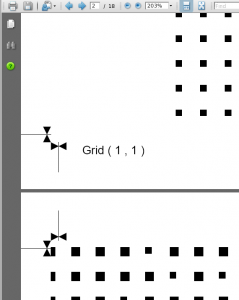
crosshairandgridref

the little cross hairs will help you line it all up

If you wanted to cheat you could use this for paste ups

But if you want stencils then is the labourious bit

Printing onto transperancies, cutting out all the squares

If you made a tool of each square size as a punch you could save some time

Then spraying aerosol enamel paint through the squares onto canvas or whatever

You get too cut out 19200 squares, woo hoo!

« Newer PostsOlder Posts »

Powered by WordPress